
Getting Started to htmx with Node.js Backend
Creating Dynamic Web Applications with htmx: A Beginner's Guide using Node.js and Fastify

Introduction
In recent years, the world of web development has seen an increase in the number of tools and libraries that aim to simplify and enhance the development process. One of these tools is htmx, a JavaScript library that allows you to add dynamic behavior to your HTML pages without writing any JavaScript code.
With htmx, you can make HTTP requests, update parts of a page, and manipulate the DOM with simple HTML attributes. In this article, we'll explore how to use htmx with the Fastify web framework to create a simple web application that performs arithmetic operations on two numbers. We'll use htmx to send the form data to the server and display the result without refreshing the page.
Let's get started by looking at the code for our basic Fastify server and the HTML form that we'll use to perform the operations.

Part 1: Setting up the server
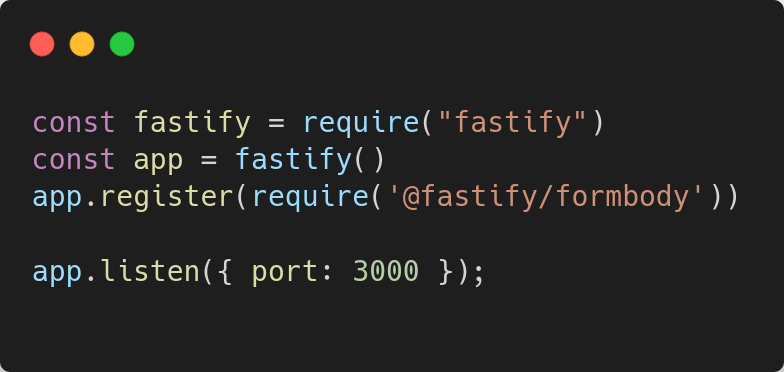
This code sets up a basic Fastify server that listens on port 3000. We also register the formbody plugin which allows us to parse form data from incoming requests.
Part 2: Creating the HTML form
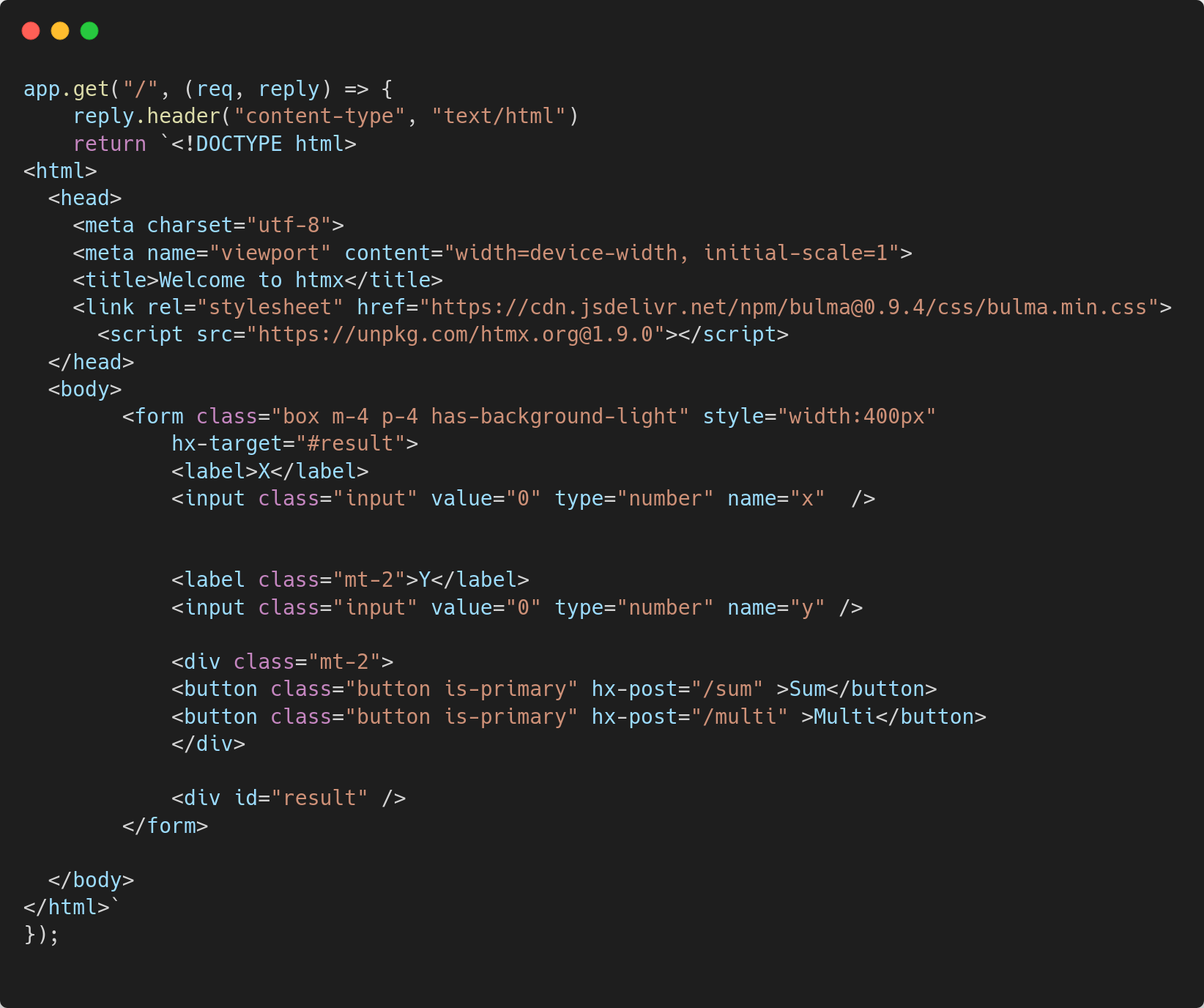
This code defines a route for the root URL (/) and returns an HTML form that contains two input fields for numbers x and y, and two buttons that perform addition and multiplication. We also include the htmx JavaScript library, which enables us to make dynamic HTTP requests to the server.
Part 3: Handling form submissions

These two code blocks define two routes, /sum and /multi, which are triggered when the corresponding buttons are clicked. Each route extracts the values of x and y from the request body, performs the corresponding arithmetic operation, and returns the result as an HTML response.
Part 4: Updating the page with htmx
hx-target="#result"This attribute is added to the form element and specifies that the result of the HTTP request should be placed in the element with the ID result.
hx-post="/sum"
hx-post="/multi"
These attributes are added to the form's submit buttons and specify the URL that should be used to handle the form submission. In this case, we have two buttons, one for performing addition (/sum action) and the other for performing multiplication (/multi action).
When the user clicks on either of the buttons, htmx will send an HTTP POST request to the specified URL (/sum or /multi) along with the form data. The response from the server will be used to update the content of the element with ID result without reloading the entire page.
Let's take a closer look at how this works. When the user enters two values in the form and clicks on either of the buttons, htmx sends an HTTP POST request to the server with the following payload:
x=2&y=3The server then performs the respective operation (addition or multiplication) and returns the result as an HTML string:
<div class="mt-2 p-2 has-background-success has-text-white">
  Sum: 5
</div>
Or
<div class="mt-2 p-2 has-background-success has-text-white">
  Multi: 6
</div>
Htmx then takes this HTML response and replaces the contents of the element with ID result with the new HTML string. This is all done asynchronously, without the need for a full page reload
Conclusion,
htmx is a powerful library that allows developers to create dynamic and interactive web applications using simple HTML attributes. With htmx, it is possible to create dynamic content, perform server-side operations, and update the page without a full page reload.
In this article, we demonstrated how to use htmx to perform simple arithmetic operations on a web page without reloading the entire page. We started by setting up a basic web server using Node.js and Fastify, then introduced htmx and its key attributes (hx-get, hx-post, hx-trigger, and hx-target).
We then walked through the process of creating a simple form that allows users to enter two values and perform either addition or multiplication using htmx. Finally, we discussed how htmx updates the page content asynchronously, without the need for a full page reload.
Overall, htmx is a great library for developers who want to create dynamic and responsive web applications without having to learn complex JavaScript frameworks. With its simple syntax and powerful features, htmx is a valuable tool for anyone looking to create fast, modern web applications.